
Module 2b - Update on Statuses
We’ve learned a lot about how to most effectively use Rock. Based on what we’ve learned, we’ve updated Module 2 regarded record statuses, connection statuses, and organizational tags.
Please watch this new, updated video to “relearn” how these functions operate for our team.
To add some clarity, we’ve created a guide to help walk through these statuses in more detail.
Please take a few minutes to review this guide to statuses!
So what changed?
Ultimately, we took away the ability of staff members to change record statuses, connection statuses, and organizational tags. These tools have very specific processes and we want to limit their editing to our Oversight Team and our Spiritual Development team, as they lead and oversee our membership processes.
If you believe someone needs to have their status changed, you can click the Actions tab on the top right corner of a person’s profile and select Person Data or Status Update.
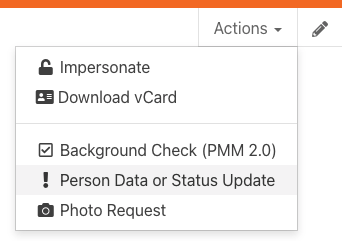
On the next page, you’ll be able to provide the details behind this request so we can begin the appropriate process.
Please complete the survey below to confirm you have completed this update.